

Funnel Webhooks
Send webhook postbacks to external systems when funnel events occur.
OptiPub can send webhook postbacks to external URLs when funnel events fire. This lets you notify third-party systems — such as CRMs, analytics platforms, or custom backends — in real time when subscribers take actions like signing up, opening an email, or clicking a link.
Webhooks are sent using the Make Post Request to Url funnel action. It can send either a GET or a POST request, and you can either send OptiPub's default JSON payload (subscription, subscriber, and event data) or supply your own custom request body. URLs and request bodies support macros so you can inject subscriber-specific values like email address or ESP variables.
Setting Up a Funnel Webhook
Step 1. Create or edit a funnel.
Open an existing funnel or create a new one in Marketing > Funnels.
Step 2. Add a trigger event.
Choose the funnel event that should trigger the webhook (e.g., New Subscription, Email Opened, Email Clicked). Click the + button on the event grid to add one.
Step 3. Add the "Make Post Request to Url" action.
Click the + button under your trigger event and select Make Post Request to Url from the action list.
Step 4. Configure the request.
| Field | Description |
|---|---|
| Name | Internal label for the action (not visible to subscribers). |
| Only once | When enabled, the action fires only once per subscriber for this funnel. Useful for avoiding duplicate notifications. |
| Meta Conversions API | Optional shortcut button. Opens a dialog for Pixel ID, access token, and event name, then prefills the URL and a JSON body that uses macros such as {$email_hash_meta}, {$fbc}, and {$unix_timestamp}. You can still edit the fields afterward. Existing actions that use {$email_sha256} keep working. |
| Google Enhanced Conversions | Optional shortcut button. Opens a dialog for Google Ads customer ID, conversion action ID, and optional MCC login customer ID, then prefills a Data Manager ingest URL and JSON body. OptiPub authenticates with the Google Ads Data Manager integration at send time — the access token is not stored on the funnel action. |
| URL | The full endpoint URL including https://. This is where OptiPub sends the request. Supports macros. |
| Method | The HTTP method to use: GET or POST. Defaults to POST. |
| Body encoding (POST only) | How the request body is encoded: JSON (Content-Type: application/json) or Form (URL-encoded) (application/x-www-form-urlencoded, like a typical HTML form post). Defaults to JSON. |
| Custom body (POST only) | An optional custom request body. Leave blank to send OptiPub's default payload. See Customizing the request body. |
| Send Only If Active | When enabled, the request only fires if the subscription is still active. |
GET requests send no body. When Method is set to GET, the body encoding and custom body fields are hidden. To pass data on a GET request, include it as query-string parameters in the URL using macros (see below).
Google Ads Data Manager must be connected under Admin → Settings → Integrations (and the Data Manager API enabled on the Google Cloud OAuth project) before a Google Enhanced Conversions action can send. Connect with a Google account that can access the Ads account. The conversion action must be type
UPLOAD_CLICKS(shown in Google Ads as Website — Import from clicks). This uses Google's Data Manager API, not the legacy Ads APIUploadClickConversionsendpoint.
Step 5. Set the timing.
Choose when the webhook should fire after the trigger event:
| Option | Behavior |
|---|---|
| Immediately | Fires as soon as the event occurs. |
| Specific Day / Time | Fires on a specific day and time after the event. |
| Delayed | Fires after a set delay (e.g., 30 minutes, 2 hours). |
| Delayed at a Specific Time | Fires after a set number of days, at a specific time. |
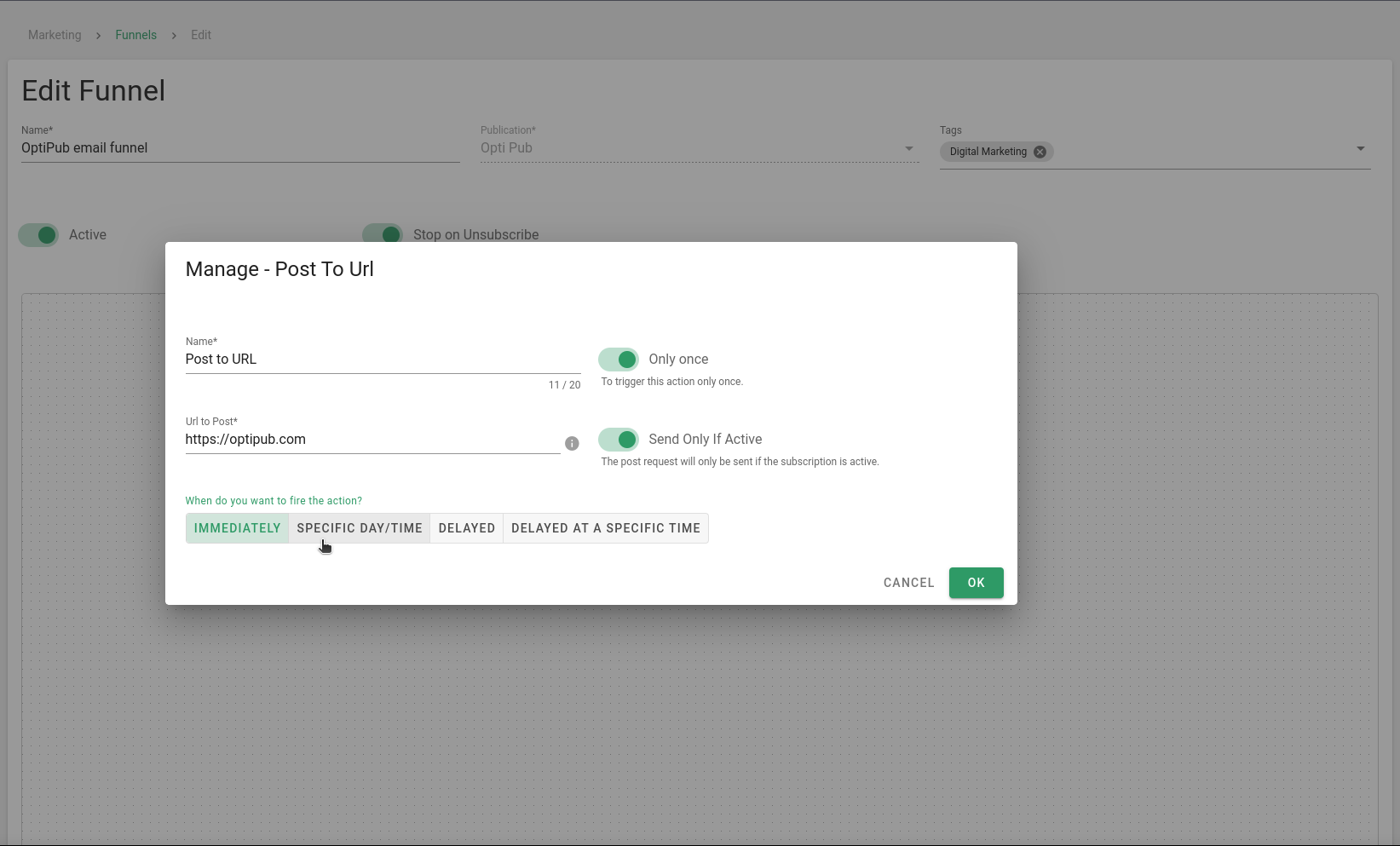
Timing options for the webhook action.
Step 6. Save.
Click OK to add the action, then Save the funnel.
Webhook Payload
When a POST request fires without a custom body, OptiPub sends this default JSON payload to the configured URL. It includes the full subscription, subscriber (with emails and ESP variables), and event context. To send your own body instead, see Customizing the request body.
{
    "id": 715462777,
    "active": true,
    "email_id": 10048162,
    "publication_id": 7,
    "subscriber_id": 57343261,
    "started_at": "2024-10-17 16:11:50",
    "ended_at": null,
    "deleted_at": null,
    "created_at": "2024-10-17T16:11:50.000000Z",
    "updated_at": "2024-10-17T16:11:50.000000Z",
    "publication": {
        "id": 7,
        "name": "OptiPub Daily",
        "active": true,
        "code": "opd"
    },
    "subscriber": {
        "id": 57343261,
        "created_at": "2024-10-17T16:11:50.000000Z",
        "updated_at": "2024-10-17T16:11:50.000000Z",
        "emails": [
            {
                "id": 10048162,
                "email": "[email protected]",
                "md5": "01f6ea24e7137bd99a7b73436fd7ef30",
                "variables": [
                    { "id": 1002021, "name": "phone", "value": "5554445949" },
                    { "id": 1002703, "name": "first_name", "value": "John" },
                    { "id": 1002707, "name": "last_name", "value": "Doe" }
                ]
            }
        ]
    },
    "email": {
        "id": 10048162,
        "email": "[email protected]",
        "md5": "01f6ea24e7137bd99a7b73436fd7ef30"
    },
    "event": {
        "event": "NewSubscription",
        "data": {
            "ip": "17.30.57.47",
            "user_agent": "Mozilla/5.0 (Macintosh; Intel Mac OS X 10_15_7) AppleWebKit/537.36",
            "referring_url": "https://example.com/landing-page",
            "effort_id": "809502",
            "variables": [
                { "name": "first_name", "value": "John" },
                { "name": "last_name", "value": "Doe" },
                { "name": "phone", "value": "5554445949" }
            ]
        }
    },
    "subscription": {
        "id": 715462777,
        "active": true,
        "email_id": 10048162,
        "publication_id": 7,
        "subscriber_id": 57343261,
        "started_at": "2024-10-17 16:11:50"
    }
}
The payload above is condensed for readability. The actual payload includes additional fields on the
subscription,subscriber, and nested objects.
Macros
Both the URL and a custom request body support macros — placeholders that OptiPub replaces with subscriber-specific values when the request fires. Macros use the format {$name} and are case-insensitive.
| Macro | Value |
|---|---|
{$email} | The subscriber's email address for this subscription. |
{$email_md5} | The MD5 hash of that email address. |
{$email_sha256} | The SHA-256 hash of the OptiPub email (trimmed, lowercased). |
{$email_hash_meta} | Alias of {$email_sha256}. Used by the Meta Conversions API shortcut for em matching. |
{$email_hash_google} | SHA-256 after Google Enhanced Conversions normalization: all whitespace stripped, then for gmail.com / googlemail.com only, . and +suffix are removed from the local part. |
{$locale} | The language stored on the email address, as a language code such as de. Empty when none has been recorded. |
{$timezone} | The IANA timezone stored on the email address, such as America/New_York. Empty when none has been recorded. |
{$ip_address} | The IP address from the triggering event, when available. |
{$user_agent} | The user agent from the triggering event, when available. |
{$referring_url} | The referring URL from the triggering event, when available. |
{$gclid} | The gclid query parameter from referring_url, when present. |
{$fbclid} | The fbclid query parameter from referring_url, when present. |
{$fbc} | Meta CAPI click ID (fb.1.{unix_ms}.{fbclid}) when fbclid is present; otherwise empty. |
{$effort_id} | The effort ID from the triggering event, when available. |
{$unix_timestamp} | The current Unix timestamp (seconds since epoch) when the request fires. |
{$rfc3339_timestamp} | The current UTC time as RFC 3339 (Y-m-dTH:i:sZ) when the request fires. |
{$esp_<name>} | Any ESP variable stored on the email, by variable name — e.g. {$esp_first_name}, {$esp_phone}. |
Where macros work:
- In the URL — values are automatically URL-encoded, so macros are safe to use in query-string parameters (e.g.
https://example.com/hook?email={$email}). This is the primary way to pass data on GET requests. - In a custom body — macros are substituted inside string values (not keys). Values are inserted as-is (not URL-encoded).
Click IDs ({$gclid}, {$fbclid}, {$fbc}) are taken from the referring_url query string. Many OptiPub paths set referring_url from the HTTP Referer header, which browsers often strip of click IDs. Landing pages that post the full landing URL (query string included) will populate them; Referer-only flows often will not.
Customizing the Request Body
For POST requests, you can replace the default payload with your own body by filling in the Custom body field. Leave it blank to send the default payload.
Enter a valid JSON object. If the body is empty or is not valid JSON, OptiPub falls back to the default payload.
The Body encoding setting controls how the body is sent:
| Encoding | Content-Type | Behavior |
|---|---|---|
| JSON | application/json | The JSON object is sent as the raw request body. |
| Form (URL-encoded) | application/x-www-form-urlencoded | Enter a JSON object of field names to values; OptiPub sends it as URL-encoded form fields. With the default payload, nested keys use bracket notation. |
Example — custom JSON body with macros:
{
    "email": "{$email}",
    "first_name": "{$esp_first_name}",
    "source": "optipub",
    "effort": "{$effort_id}"
}
Custom headers and HTTP methods other than GET/POST are not currently supported on generic Post to URL actions. Google Enhanced Conversions is the exception: OptiPub attaches a refreshed OAuth
Authorizationheader (andx-goog-user-project) when the URL is the Data Manager ingest endpoint.
Common Use Cases
| Use Case | Example |
|---|---|
| CRM sync | POST new subscriber data to your CRM when they sign up. |
| Analytics tracking | Notify your analytics platform when subscribers open or click. |
| Partner postbacks | Fire a conversion postback to an affiliate or ad network. |
| Meta Conversions API | Use the Meta shortcut to send hashed email and click ID ({$fbc}) to Graph API. |
| Google Enhanced Conversions | Use the Google shortcut to upload leads to Google Ads via Data Manager. |
| Slack/Teams alerts | Send a notification to a webhook URL when a high-value event occurs. |
| Custom workflows | Trigger downstream automation in Zapier, Make, or a custom API. |
Updated about 2 months ago