

optipub-resource
This "optipub-element" retrieves the specified resource. Check out Getting Started With OptiPub Elements first.
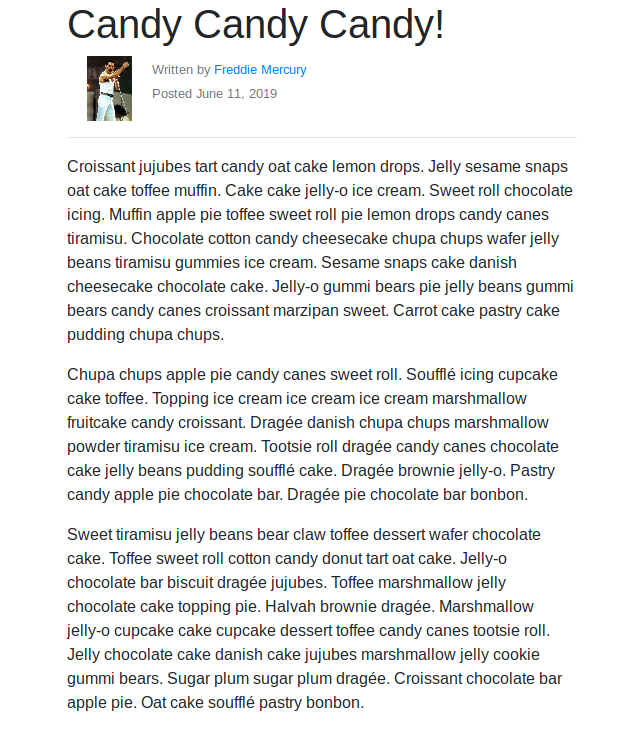
Usage
Required PropertyThe
optipub-resourceelement requires aresource-idproperty to be defined on the element.
<optipub-resource resource-id="1"></optipub-resource>Custom Properties
| Property | Description | Example |
|---|---|---|
| "author-image-size" | Used to determine the size of the author thumbnail image displayed on the resource. | author-image-size="125px" |
| "author-url" | Used to specify the dynamic property to build the links for the authors. | author-url="display_name" |
| "author-url-prefix" | Used to specify the dynamic property to build the prefix of the links for the authors. | author-url-prefix="/editors/" |
| "locale" | Pin the displayed language (for example de) and skip browser / saved-preference detection. | locale="de" |
The element always requests published translations with the resource. When other language versions exist, a language dropdown appears at the top right. Changing it saves the choice to localStorage and an optipub_locale cookie so it persists across reloads. The locale property, when set, is used instead of that saved preference and instead of the visitor's browser language. If a translation is missing for the selected language, the original resource is shown.
Resources marked as external in OptiPub send the visitor to their external URL instead of rendering the resource body. The public API omits content, content_data, and pdf for those rows.
Complete Example
<optipub-resource
                 resource-id="1"
                 locale="de"
                 author-url-suffix="display_name"
                 author-url-prefix="/editors/"
                 author-image-size="100px"
                 columns="title,description,active,display_on_website"
                 sort="rank"
                 sort-direction="asc"
                 per-page="20"
                 page="1"
></optipub-resource>
Updated about 2 months ago